Shapes
Pix provides five built-in shape statements. Each is a shorthand that resolves to an underlying mathematical expression.
pixel
Draws a single point at the given coordinates.
pixel (<x>, <y>) with <color>grid 9 by 9
pixel (4, 4) with #e84a00
export "pixel" in png scale 16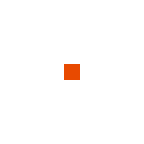
line
Draws a line between two points. Both endpoints are included.
line (<x1>, <y1>) to (<x2>, <y2>) with <color>grid 9 by 9
line (1, 1) to (7, 7) with #e84a00
export "line" in png scale 16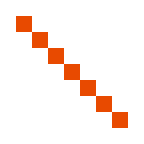
Handles horizontal, vertical, and diagonal lines. Diagonal lines use a cross-product calculation to determine which pixels lie on the path.
rectangle
Draws the interior of an axis-aligned rectangle. The two points define opposite corners and can be given in any order. Boundary pixels are excluded.
rectangle (<x1>, <y1>) to (<x2>, <y2>) with <color>grid 9 by 9
rectangle (1, 1) to (7, 7) with #e84a00
export "rectangle" in png scale 16
triangle
Draws the interior of a triangle defined by three vertices. Uses half-plane tests to determine which pixels lie inside.
triangle (<x1>, <y1>) to (<x2>, <y2>) to (<x3>, <y3>) with <color>grid 17 by 17
triangle (8, 1) to (1, 15) to (15, 15) with #e84a00
export "triangle" in png scale 8
circle
Draws a filled disc defined by a center point and a radius. A pixel is filled if its squared distance from the center is strictly less than the squared radius.
circle (<cx>, <cy>) radius <r> with <color>grid 17 by 17
circle (8, 8) radius 7 with #e84a00
export "circle" in png scale 8
Shapes and draw order
Shape statements follow the same execution order rules as
draw. A shape drawn later overwrites pixels from earlier
statements.
grid 33 by 33
circle (16, 16) radius 15 with #e84a00
circle (16, 16) radius 12 with #e8ddd0
circle (16, 16) radius 9 with #e84a00
circle (16, 16) radius 6 with #e8ddd0
circle (16, 16) radius 3 with #e84a00
export "target" in png scale 4